Student vision board
A student vision board won’t revise for you. What it can do is keep the reason in view on a wet Tuesday in February, when the exam is weeks away and your phone is right there. Here’s how to make one that earns its place on your lock screen.
Start my student boardFree, with no account needed. It takes about 10 minutes.
Plan it on paper first
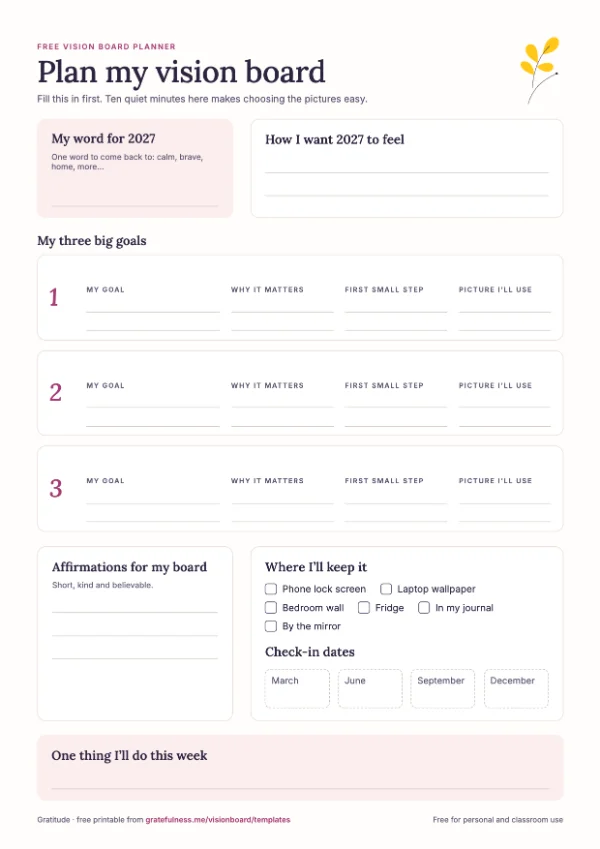
This free planner walks you through it: a word for the year, three goals with why each one matters, the first small step and check-in dates. Fill it in, then make the board. A4 and US Letter.
More printables on the templates page.
Student vision board ideas
Pick the two or three that matter most this year. Each button opens the maker with those goals already written in; change the grades and dates to yours.
-
Better grades
Goals to write
- An A in chemistry
- Homework done before 8
- Ask one question in every class
Photos to find
Your actual subject: the periodic table, the novel you’re studying, a page of your own notes. Then the grade, written big.
Try on Pinterest: study aesthetic · neat notes aesthetic
Affirmations
- I understand more every week
- I am capable of learning this
- Hard subjects get easier with practice
-
Exams without panic
Goals to write
- Study with my phone in another room
- Revision timetable up by March
- Eight hours’ sleep the week of exams
Photos to find
A clear desk, a library table, a timer. Calm, ordinary study days are the ones that add up.
Try on Pinterest: library study aesthetic · desk setup study
Affirmations
- I have prepared, and I am ready
- I can stay calm and focused
- One exam at a time
-

College and what’s next
Goals to write
- Get into my first-choice college
- Personal statement done by October
- A summer internship
Photos to find
The campus itself, the library, the city it’s in. Picture yourself walking there, not just the logo.
Try on Pinterest: college campus aesthetic · dorm room aesthetic
Affirmations
- I belong where I’m going
- My hard work is opening doors
- I am ready for what’s next
-

Money of my own
Goals to write
- Summer job, $1,500 saved
- A term-time budget I stick to
- Pay for my own concert tickets
Photos to find
The job, the jar, the thing you’re saving for. A first paycheck is a very good photo.
Try on Pinterest: summer job aesthetic · student budget planner
Affirmations
- I earn and save with care
- Small amounts add up
- I am good with money
-

Look after yourself
Goals to write
- In bed by 11 on school nights
- Run or walk three times a week
- Cook three simple meals
Photos to find
A made bed, running shoes by the door, a bowl of something you can actually cook. You study better rested.
Try on Pinterest: healthy student routine · easy student meals
Affirmations
- Rest is part of studying
- I look after my body and my mind
- I deserve a break
-

A life outside study
Goals to write
- Road trip after exams
- Join one new club
- Movie night with friends every Friday
Photos to find
The open road, the friends, the club. Put the reward on the board as well as the work.
Try on Pinterest: road trip with friends · summer after graduation
Affirmations
- I make time for the people I love
- Fun is part of a good year
- I’ve earned this
Student vision board examples
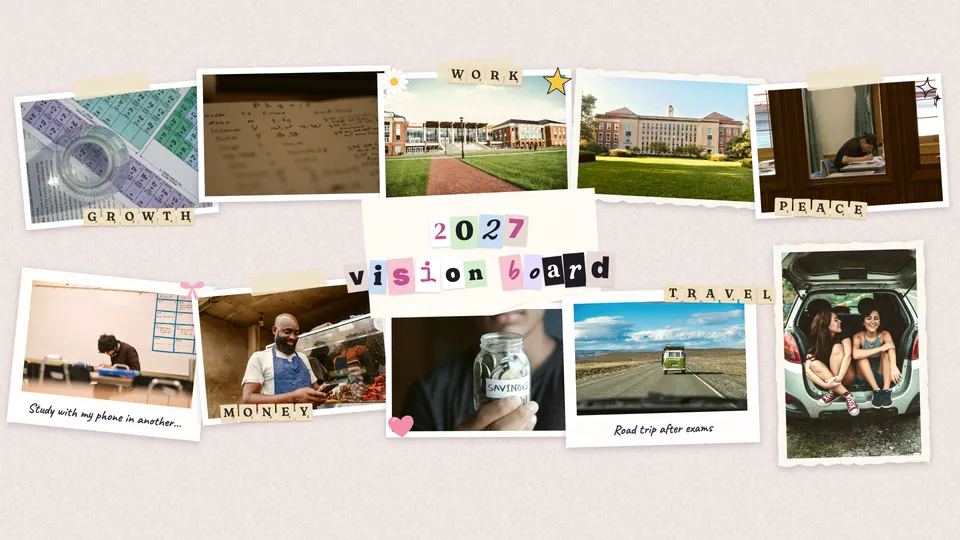
Five goals, two photos each: the subject, the college, the study habit, the job and the reward. Same board, two looks:
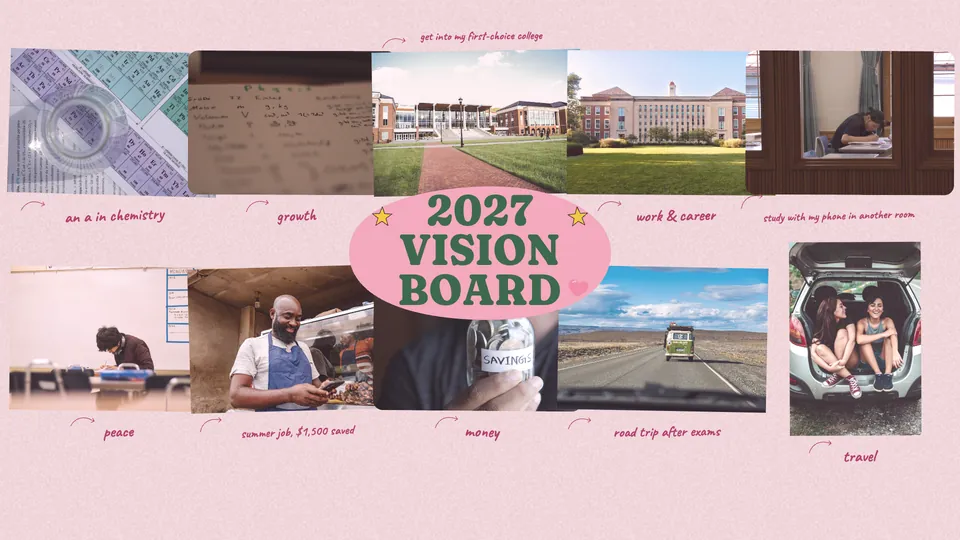
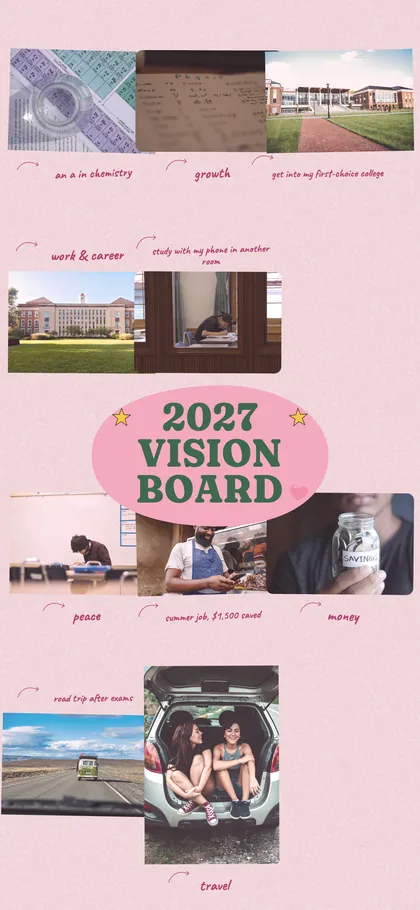
Every board also comes out as a phone wallpaper, laid out for the tall screen. You’ll look at your lock screen about a hundred times a day. It might as well show you the campus.
How to make it actually work
Be specific
“Do well in school” is a wish. “An A in chemistry by June” tells you when you’ve done it, and which subject needs the extra hour.
Put the habit next to the dream
Pair the college photo with the habit that gets you there: “two hours of revision, phone in the kitchen”. The dream keeps you wanting it; the habit does the work.
Make it your lock screen
You’ll see it every time you reach for your phone to procrastinate, which is exactly when it’s useful.
Include the reward
A road trip, a concert, a lie-in. Something fun at the end makes the middle of exam season easier to get through.
Update it after results
Got the grade? Tick it, swap the goal for the next one and download it again. Didn’t? Change the plan, not the dream.
Study affirmations for your board
Pick ones you can say with a straight face the night before an exam. Put one under a photo.
- I am prepared and I am capable
- I can learn anything with time and practice
- Every hour of study counts
- I stay focused on what I can control
- My grades don’t define me, but I’m proud of my effort
- I ask for help when I need it
- Rest makes me sharper
- I am becoming the person I want to be
- I finish what I start
- I belong where I’m going
Journal prompts to go with it
Ten minutes with these first, and the board will be about your year, not everyone else’s.
- What would make this school year feel like a success to me, not to anyone else?
- Which subject needs the most from me, and what’s one thing I could change about how I study it?
- Where do I want to be a year from now?
- What usually gets in the way of studying, and how can I make it harder?
- Who could help me this year: a teacher, a friend, a tutor?
- What will I do to celebrate when exams are over?

Want help keeping it up? The Gratitude app has a daily journal with prompts like these, and affirmations you can listen to on the way to an exam. Get the Gratitude app
Student vision board images on Pinterest
Tap a search to open it on Pinterest. Drag the images that feel like you into the maker. On a phone, save them to your photos and upload them.
Grades and exams
Life outside study
Questions people ask
Do vision boards help students?
A board can’t sit the exam. What it does well is keep a far-off goal in front of you on the days it feels far away, which is most of them. Pair each goal with one habit, put the board on your lock screen, and it has a real job.
What should I put on a student vision board?
Two or three goals for school with a grade or a date, the college or next step you want, one study habit, one thing for your health and one reward. Use photos of real places and your own notes where you can.
Can teachers use this with a class?
Yes. The maker needs no accounts, so students can each make one on a school laptop in a lesson, and the planner printable is free to print for a class. Boards stay in each browser, so have students download theirs before the end.
Can I make one on my phone?
Yes. Open the maker in your phone’s browser, add photos from your camera roll, save the board to your photos and set it as your lock screen.
Is it free?
Yes, with no account and no watermark. It takes about ten minutes.
Free, with no account needed. It takes about 10 minutes.
More vision board templates
- Career vision board
- Money vision board
- Health and fitness vision board
- Love and relationship vision board
- Family and friends vision board
- Travel vision board
- Dream home vision board
- Personal growth vision board
- Joy and hobbies vision board
- Peace and calm vision board
- Vision board for kids
- Scrapbook vision board
- Mosaic vision board
- Minimalist vision board
- Doodle vision board